Mac & Windows
Speech recognition
Recognize the speech in your recordings and edit by reading the words. Especially useful for audiobooks and long recordings.
How it works
Recognize speech in one click
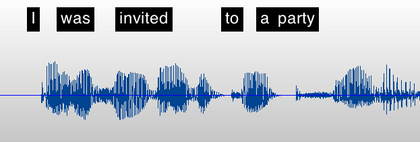
In just one click, TwistedWave recognizes the speech in your audio file. It can also recognize speech in real time while you record.
The recognized text appears right above the waveform, so you can see what's being said without playing it back.
Audiobooks
Sync with your text script
Load a text script from an RTF or PDF file, or straight from the clipboard, and TwistedWave lines it up with the speech recognized in your audio.
- Select words, and TwistedWave selects the audio.
- Select audio, and TwistedWave selects the words.
Live transcription
Real-time recognition while recording
TwistedWave can transcribe your voice as you speak. On Mac, Apple's engine and Parakeet do it live; on Windows, the Zipformer and Nemotron streaming models do the same. The recognized text scrolls automatically as you record.
Choice of engines
Several speech recognition engines
Pick the engine that best matches your language, your computer, and the accuracy you need. Every one runs on your own machine.
NVIDIA Parakeet
Extremely fast and accurate, with English-only and multilingual models (the multilingual one auto-detects the language). On Mac it runs on Apple Silicon (macOS 14 or later) and transcribes in real time as you record.
OpenAI Whisper
Very accurate, recognizing speech in nearly 100 languages. It comes in a range of model sizes, from small and fast to large and extremely accurate, with dedicated English-only models for the best English results.
Apple Speech
The same on-device engine that powers Siri. It recognizes speech in any language your Mac supports for dictation, and because it's built into macOS there is nothing extra to download.
Zipformer
A selection of streaming models for real-time recognition in many languages, including English, Chinese, French, Spanish, German, Russian, Korean and Japanese, plus a multilingual model.
NVIDIA Nemotron
A streaming English model for real-time recognition, with three latency profiles so you can trade a little speed for higher accuracy.
Private by design
On-device, downloadable models
Every engine runs locally on your computer, so speech recognition keeps working without an internet connection, and your recordings are never uploaded to a server.
Apart from Apple's built-in engine, each model is downloaded the first time you select it and then kept on your computer for later use. Smaller models download quickly and run fast, while larger models are slower but more accurate, so you can pick the right balance for your recordings.